
🔒 Order history and tracking details are restricted and currently visible only to designated Company Administrators and Location Administrators.
1. Access your order history. Login to the portal and navigate to Your Account in the top right corner.
Select View Past Orders.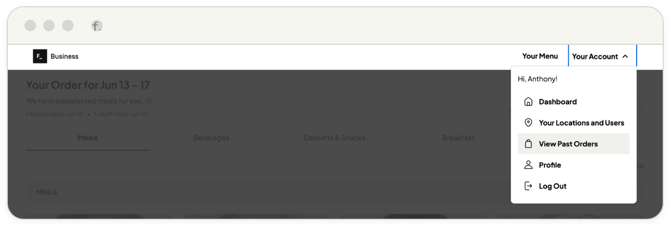
2. Filter your orders. Ensure the Confirmed tab is selected.
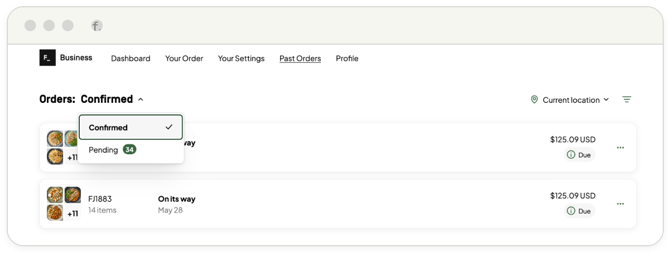
Please note: Orders listed under the Pending tab are items still sitting in your cart that have not yet been finalized or processed for shipment.
3. Review tracking and box contents.
-
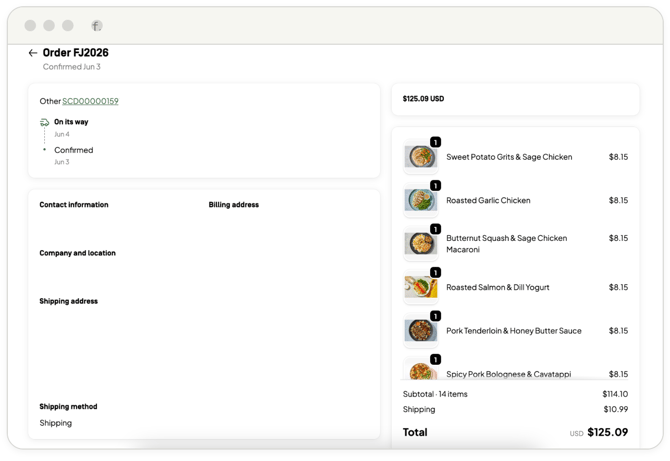
Click on any specific order to open its detailed summary.
-
Your carrier tracking details will be located on the left side of the page.
-
Multi-Box Shipments: If an order has been split into multiple shipments, the interface will list the exact meal contents of each specific box directly above its corresponding tracking number.
Tracking is location-specific.
Use the Location Toggle on the right side of the page to switch between your different locations, or select All Locations to view the tracking details for orders across your entire organization.